Version 7: Bringing Market Research Into The Games We Make
Share:

We started Game Oracle as a market research platform. The objective was pretty simple: we wanted to understand the Steam market, find relevant competitors, explore opportunities and make better decisions about the games we wanted to build.
But as we thought about what we needed for our own games, we kept coming back to the same nagging problem. You see finding useful information is only part of the work. You still have to turn it into a design, a plan, and something you can actually make.
There is so much to be gained by the data out there. A competitor's reviews might change how you approach progression or difficulty, a group of games might challenge your assumptions about price, and something as simple as a screenshot might help you explain the atmosphere you're trying to create. All of these discoveries need somewhere to go, and they need to stay useful as the game takes shape.
That's the thinking behind v7 of Game Oracle. We want the research you do to inform your planning and design, and we want you to be able to return to that data whenever development raises a new question.
Give your research somewhere to live
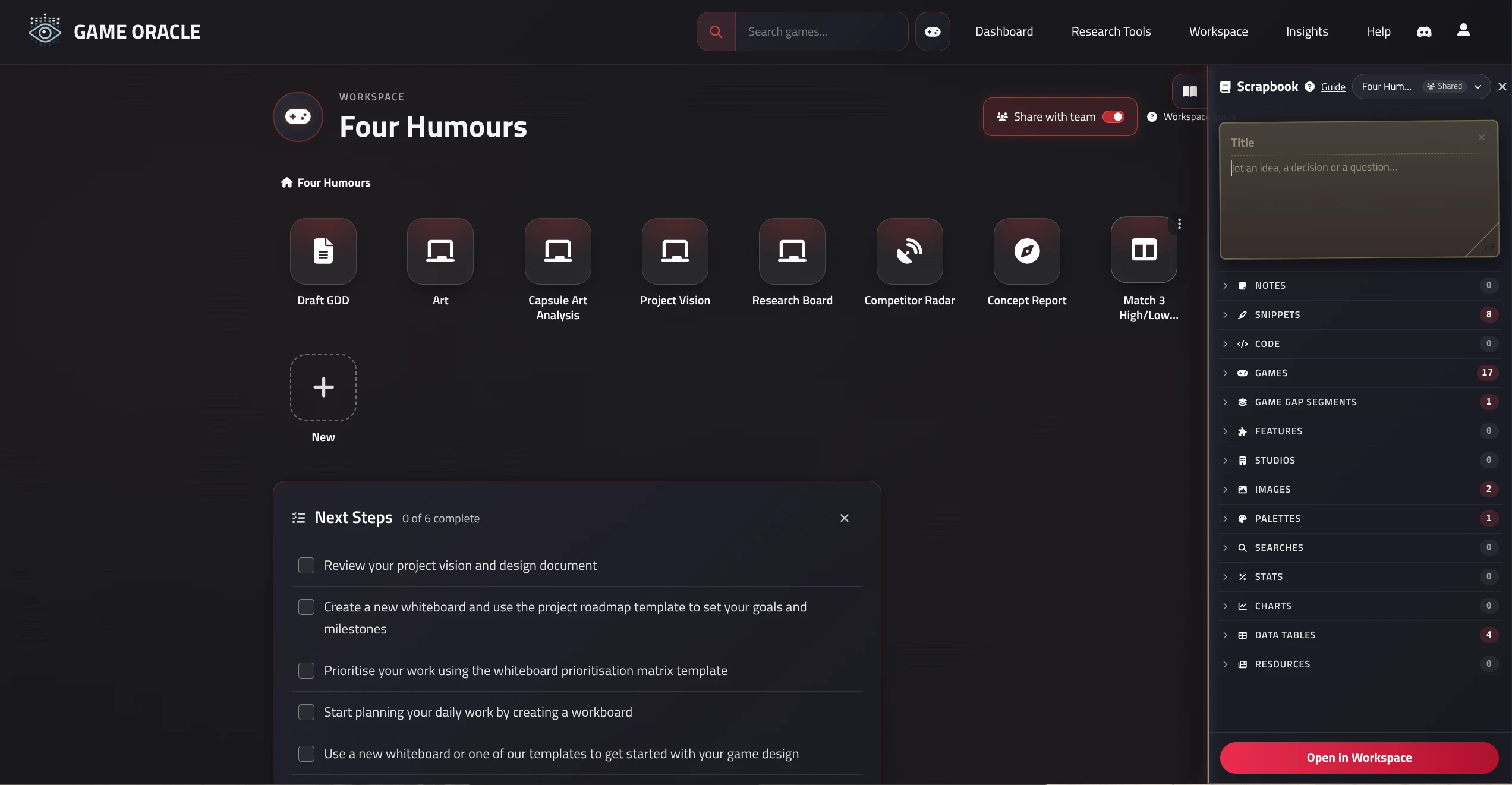
The first piece of our new and improved experience is the Scrapbook.
As you explore Game Oracle, you can collect research into a project: games, images, colour palettes, useful passages, statistics, charts, saved searches and tables of games. You can add notes so you remember what caught your attention and why it matters.
That last part is all too easy for us to underestimate. Saving a reference is useful yes, but remembering what you wanted to learn from it is much more useful. Was it the way the game introduces its systems? The readability of its art? Something players repeatedly praised or complained about? I've personally been noting all the ways players complain about balancing difficulty since it is something I seem to struggle with most!
Scrapbook gives all these discoveries a home. You can return to a saved search, revisit the source of a statistic or bring a reference into the work you're doing next.
The Workspace is then where that next step happens. Each project has a place for documents, whiteboards, competitor research, data comparisons and workboards. The research you've collected stays within reach while you write, sketch, and plan. It will also form the basis of data-driven tools that we plan to keep rolling out. We want to make it incredibly easy to inform your decisions with market data from competitors similar to your concept.
From "could this idea work?" to a starting point
Concept Compass already helps you investigate an idea: describe the game, choose its defining features and inspirations, then explore comparable games, player sentiment, projections, and practical considerations.
For us, validation means using that evidence to test assumptions. Which games share the experience we're trying to create? What do their players value? Where might our scope or expectations need another look?
However, starting from v7 that research can now become the starting point for your project. Simply choose Add to Project on a completed concept and Game Oracle populates its Workspace with:
- A Draft GDD you can edit and develop.
- A Project Vision whiteboard covering the pitch, audience, experience and design pillars.
- A Competitor Radar containing competitors from the report.
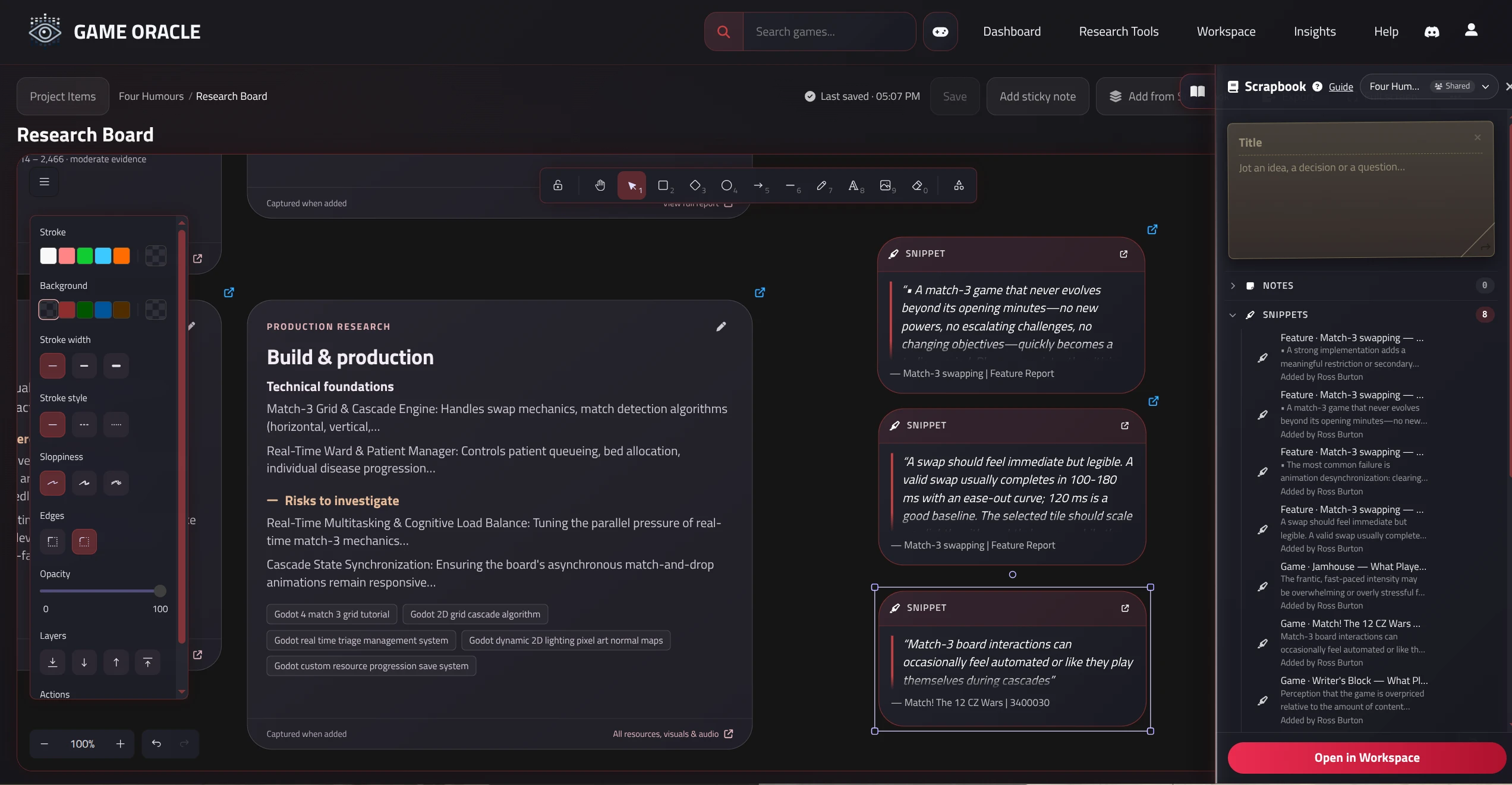
- A Research Board bringing together findings, projections, resources and marketing ideas.
- A Concept Report item so you can revisit the analysis.
- Capsule Art Analysis, when the concept has competitors, to help explore visual direction.
You can start working on items as they appear. The generated material gives you something concrete to question, rearrange, and make your own.
Keeping all your evidence next to your design
This is the part we're especially interested in for our own games. We want to be able to work on a vision with the research right there beside it.
In a Workspace document, you can write your GDD, pitch or development notes and bring in material from Scrapbook. Drop in a table of comparable games, a saved chart, a statistic linked to its source, or an annotated image. A research snippet can sit beside the design decision it helped you make.
Imagine writing a section about level progression. You could put actual relevant player feedback beside your proposed approach, then explain what you want to test in the prototype. When you revisit that section later, the reasoning is still there.
Whiteboards give you even more room to explore the same material but visually. You can map out a core loop, arrange references into a mood board, sketch a level, or build a positioning map. The flexible design makes it easy to bring in images, palettes, research cards, and charts, then add your own connections and questions around them.
And when an idea is ready to become work, a Workboard can hold the stories and tasks, with links back to Workspace pages or Scrapbook clippings. All of this means that the reason for building something can travel with the task and can be constantly cross-checked for relevance. Personally, we think this is a game changer for scope creep!
Ask the question your game actually needs
As a game or concept becomes more specific, the questions tend to become more specific too. We found that the current search tools in Game Oracle were not quite up-to-scratch for this.
A broad genre overview might help at the start, but later you might want to look only at paid indie games released in a particular period, with certain mechanics, a demo, and enough reviews to make the comparison useful. Or you might want to ask a question about the exact shortlist you've already collected for your project.
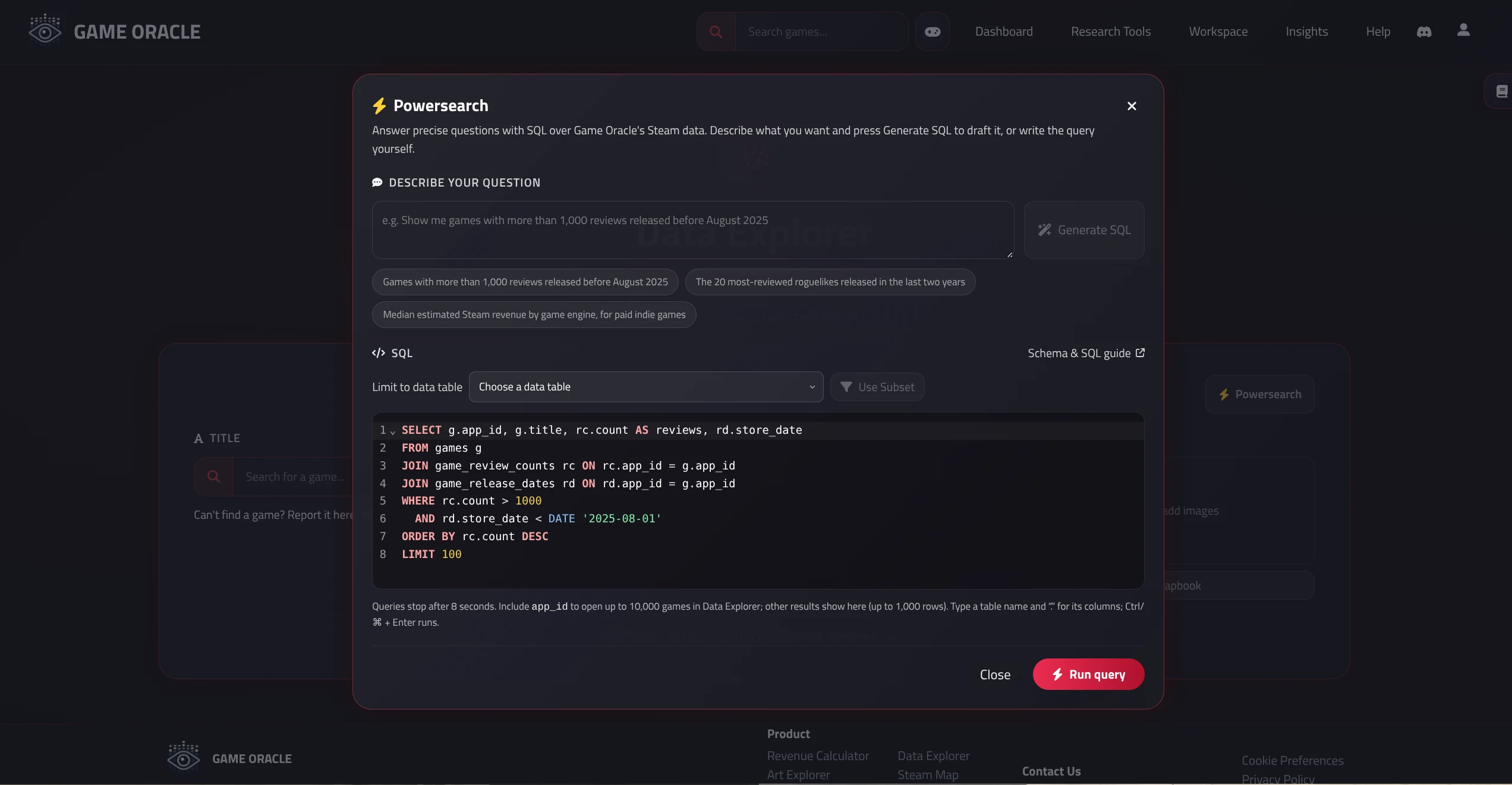
Powersearch lets you go further into those questions. You can write SQL against the available Steam catalogue data, or describe what you're looking for in plain English and generate a query to review and run.
For example:
- “Find paid indie roguelikes released from 2023 to 2025 that have a demo, at least 50 reviews and at least 80% positive reviews.”
- “Within my saved shortlist, what is the median estimated Steam revenue for each game engine?”
- “Among games with a particular mechanic, how do review scores vary across launch-price bands?”
Queries that return games can feed straight back into Data Explorer's tables and charts. You can also save those games as a dataset, and use a saved dataset to limit a later query.
All of this makes research much more iterative. You start with a question, inspect the results, refine the group, and then ask the next question, all whilst keeping an audit trial of your data in your scrapbook.
Compare alternative data and build confidence
Now that we have a way of crafting and saving specific datasets we also wanted to give users a way of comparing subsets of games. This is especially useful if you're stuck between one concept or another.
Data Comparisons lets you put two saved datasets or competitor sets side by side. The tables, charts, and descriptive statistics help you examine how those groups differ, with shared chart scales so the comparison stays readable.
You can compare typical values using medians and an uncertainty interval, rather than letting one unusually successful game dominate your impression. You can also compare player-review summaries to explore the praise and complaints that appear more often in each group.
Say you're considering two approaches to a visual style. You could build a set of relevant games for each, compare their market data, then look at what players say about them. The choice of games still matters, and a difference between groups doesn't establish what caused it. But it gives you a much more focused basis for the next design discussion or prototype.
For us, the exciting part is having that whole process connected. You define a precise group in Powersearch, compare it with another group, save the useful evidence, and bring it into the document or board where you're working through the decision.
Research that stays part of development
We built v7 because we wanted market research to keep helping us after we'd chosen an idea.
As we build, we'll have new questions about features, art direction, positioning, and scope. We want to explore those questions without losing the connection between what we've learned and what we're making.
Scrapbook, Workspace and the deeper research tools are our next step towards that. It means we can collect what matters, use it to shape our game, and come back to the evidence as our thinking changes.
If you already have a completed concept, try adding it to a project and developing one part of the generated vision. If you're still exploring, start by collecting a few references and see what sort of questions they raise.
We'd love to hear which decisions you're trying to make about your game, and what would help you make them with more confidence.